
Cloudflare DDoS Protection for Affiliate Sites How to Bulletproof Your Online Income

Introduction
Picture this. You wake up, grab your coffee, and open your affiliate dashboard. Your earnings are zero. Your site is down.
A DDoS attack is flooding your server.

Every minute it stays dark, you lose affiliate commissions. And worse, Google might start burying your pages for weeks because the site was unreachable.
If you run an affiliate site, this is not just a tech headache. It is an income emergency.
You might think DDoS attacks only hit big banks or major retailers. That is a dangerous myth. In 2026, small businesses are the biggest targets. Recent cybersecurity stats show that 46% of all cyber breaches impact small companies.
The math is painful. According to IT downtime research, outages cost small businesses between $5,600 and $22,000 per hour depending on the industry. Here is the thing. Most DDoS attacks are short and violent. One report found that 89% of DDoS attacks now last under 10 minutes. But even a 10 minute outage for an affiliate site can kill a day’s momentum and wreck your SEO rankings.
That is the double hit. You lose the sales you would have made right now. And you hurt your ability to make sales tomorrow because Google sees your site as unreliable.
The good news? You do not have to sit there and take it.
This guide shows you exactly how to use Cloudflare DDoS protection to make your affiliate sites bulletproof. We will go beyond the basics. You will learn how to build cloudflare ddos protection into an automated affiliate workflow. That way your sites stay fast, your traffic stays safe, and your passive income keeps running even when the attackers come knocking.
Whether you are promoting pet products like Fitbark or selling digital subscriptions, your site needs to stay online.
Let us start with what Cloudflare does and why it is the standard for affiliate site safety.
Why Affiliate Entrepreneurs Need DDoS Protection
Here is the truth most affiliate site owners do not want to hear. Attackers do not care how big you are. They care about how much damage they can cause with little effort. And in 2026, you are a perfect target.
According to cybersecurity statistics from the University of San Diego, 46% of all cyber breaches hit small businesses. Attackers know you probably do not have a dedicated security team. They see your affiliate site as an easy win.
The moment a DDoS attack hits, your site goes dark. Visitors see an error page instead of your carefully written reviews. Your affiliate links become useless. And every second that passes costs you real money.
How much? IT downtime research from AlphaCIS shows that small businesses lose between $5,600 and $22,000 per hour during outages. Even a short attack hurts. StationX reports that 89% of DDoS attacks now last under 10 minutes.
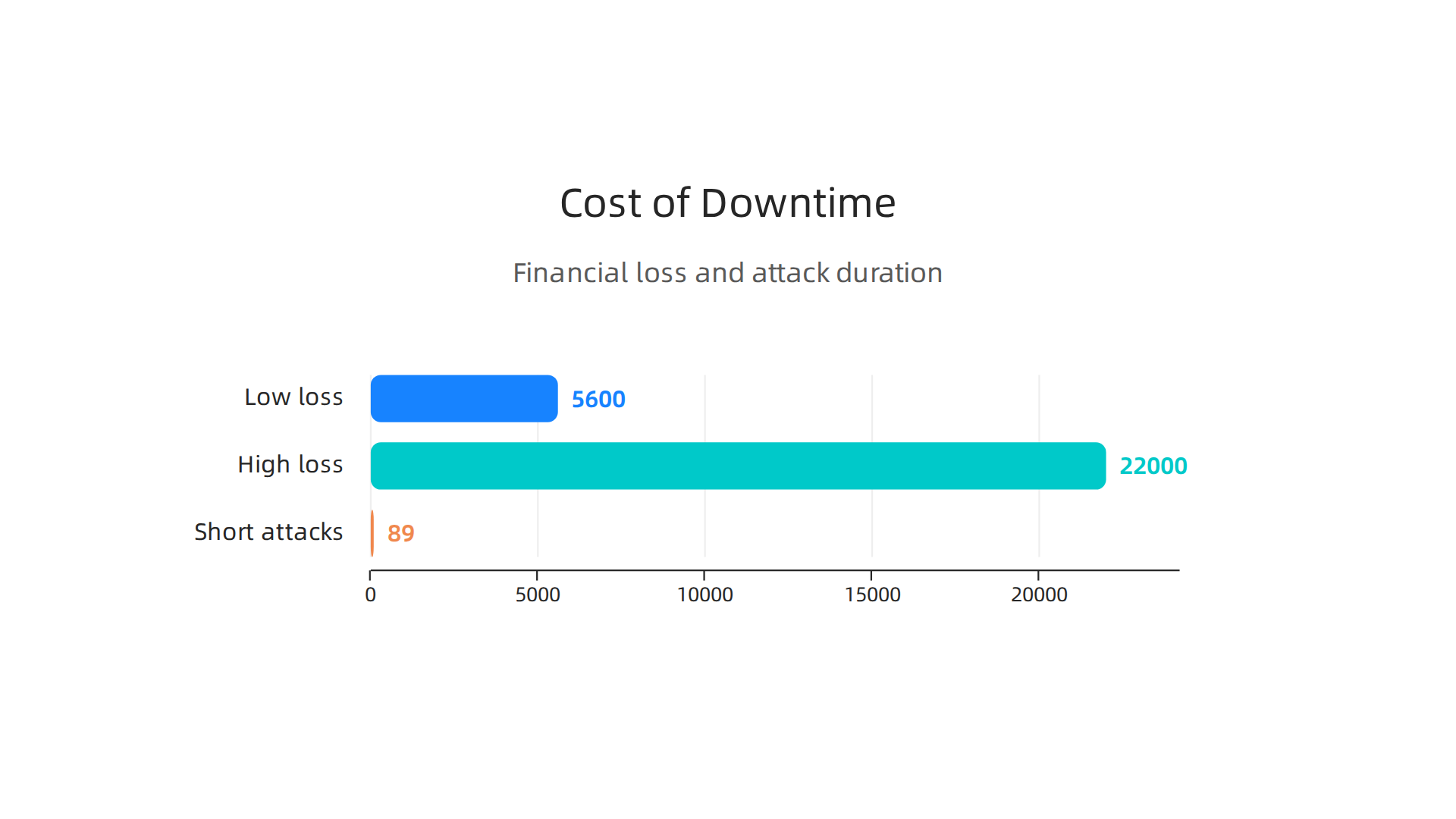
But those ten minutes can destroy the momentum you spent months building.
Think about it. Google hates unreliable sites. If your site drops offline repeatedly, your search rankings start to slip. Pages that once brought you steady traffic may stop ranking altogether. That means you lose commissions today and you lose future commissions too.
Worse, your visitors lose trust. If someone clicks your link to buy something like a Fitbark pet tracker and the page will not load, they will likely move on to a competitor. They may not come back.
That is why DDoS protection is not optional for affiliate entrepreneurs. You work hard to build your income. A ten minute attack should not take it all away. Cloudflare offers affordable protection that filters out bad traffic before it reaches your server. In the next section, we will walk through exactly how to set it up so your site stays online no matter what.
Understanding Cloudflare’s DDoS Protection Tiers
Now that you know why your affiliate site needs DDoS protection, let us talk about how Cloudflare makes it easy to get started. Cloudflare offers four main tiers: Free, Pro, Business, and Enterprise. Each one builds on the last, giving you more control and stronger protection.
The good news is that every plan includes unmetered DDoS protection. That means you never pay extra when an attack happens. According to a detailed breakdown of Cloudflare pricing in 2026, all plans include CDN, DNS, Universal SSL, and that vital DDoS mitigation.
Let us break down what each tier offers so you can pick the right one for your affiliate business.
Free Plan
This is where you start. The Free plan gives you basic DDoS protection, a global CDN, and a free SSL certificate. It is great for new affiliate sites with low traffic. But here is the thing. You do not get custom rules, rate limiting, or advanced bot management. If you are just testing the waters, this works. But once your site starts growing, you will want more.
Pro Plan
For most affiliate entrepreneurs, the Pro plan is the sweet spot. At around $20 per month, you get everything in Free plus automatic rate limiting, a Web Application Firewall (WAF), and enhanced DDoS alerts. This is where you can start writing custom rules to block bad traffic. The Cloudflare Pro Plan overview explains that this tier is built for websites, blogs, and startups that need basic security and performance. That sounds like your affiliate site, right? With Pro, you also get real-time analytics so you can monitor your traffic and spot attacks early.
Business Plan
If your affiliate site generates consistent income and you cannot afford downtime, look at the Business plan. It costs about $200 per month but includes advanced DDoS mitigation, 50 page rules, and image optimization. You also get SLA-backed uptime, which means Cloudflare guarantees your site stays online. A comparison of Cloudflare Free vs Paid Plans in 2026 highlights that the Business tier offers custom WAF rules and advanced DDoS alerting. For affiliate entrepreneurs who rely on steady traffic, this level of protection is worth the investment.
Enterprise Plan
This is for large businesses with custom needs. Pricing is custom, and you get dedicated support, advanced bot management, and priority routing. Most affiliate marketers will not need this. But it is good to know it exists.
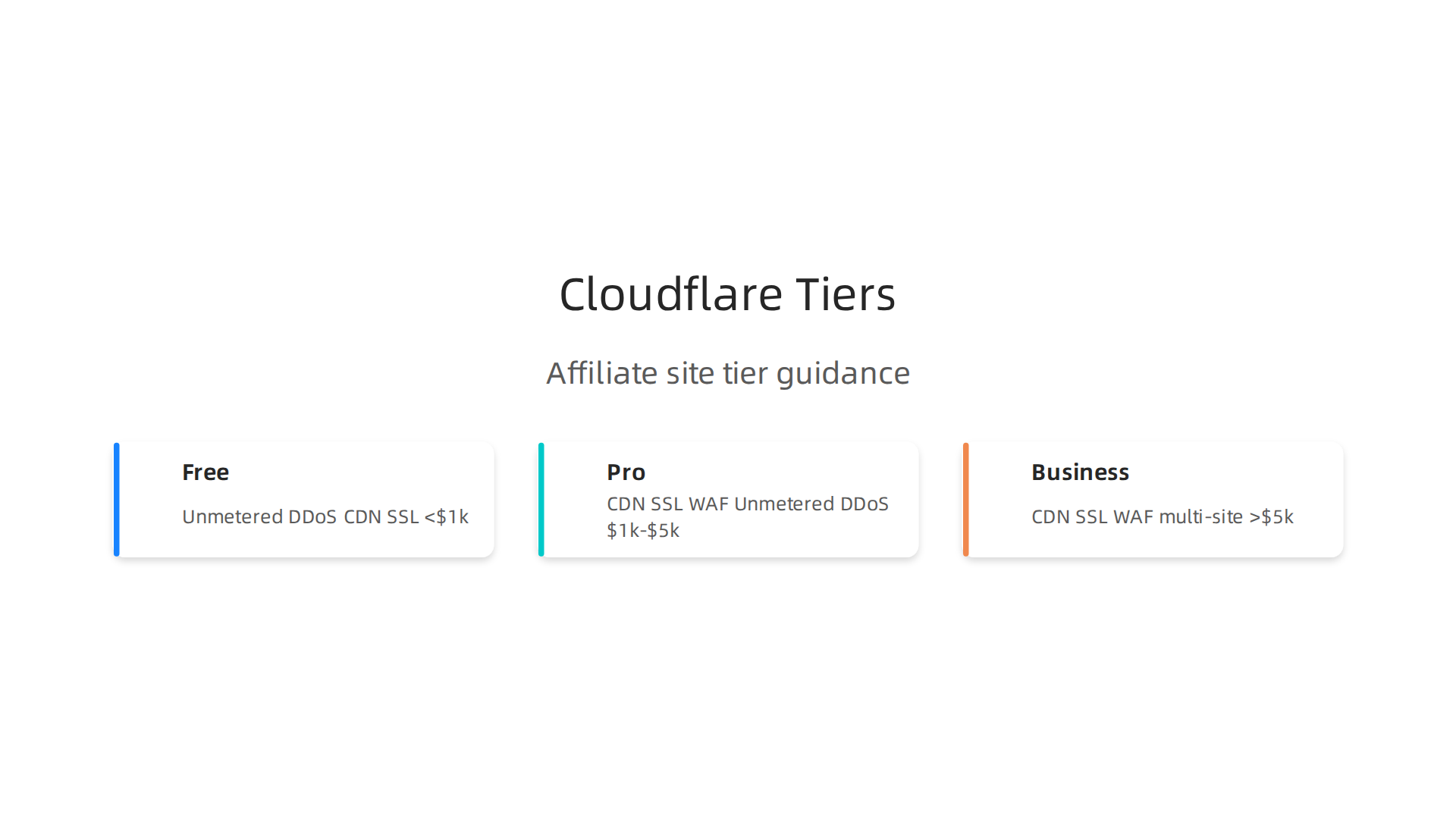
Here is a simple way to think about it. If your site earns less than $1,000 per month, start with Free. If you earn between $1,000 and $5,000, Pro is your best bet. If you earn more than $5,000 or run multiple sites, Business gives you the peace of mind you need.
Once you pick your tier, you can set up your account and point your domain to Cloudflare. This process is straightforward and only takes a few minutes. You can even run a quick cloudflare test to check your site’s performance and protection level after setup.
Remember, your affiliate site is an asset. Protecting it with the right tier keeps your income safe. And when your site stays online, you can confidently promote products like Fitbark pet trackers without worrying about downtime costing you commissions.
Strategic Integration of Cloudflare DDoS Protection into Your Automated Affiliate Workflow
Picking the right Cloudflare tier is a good first step. But the real power comes when you make DDoS protection a seamless part of your automated system. If you run multiple affiliate sites, doing this manually for each one will waste time and leave gaps. Here is how you can weave Cloudflare DDoS protection into your workflow so every site stays safe without extra effort.
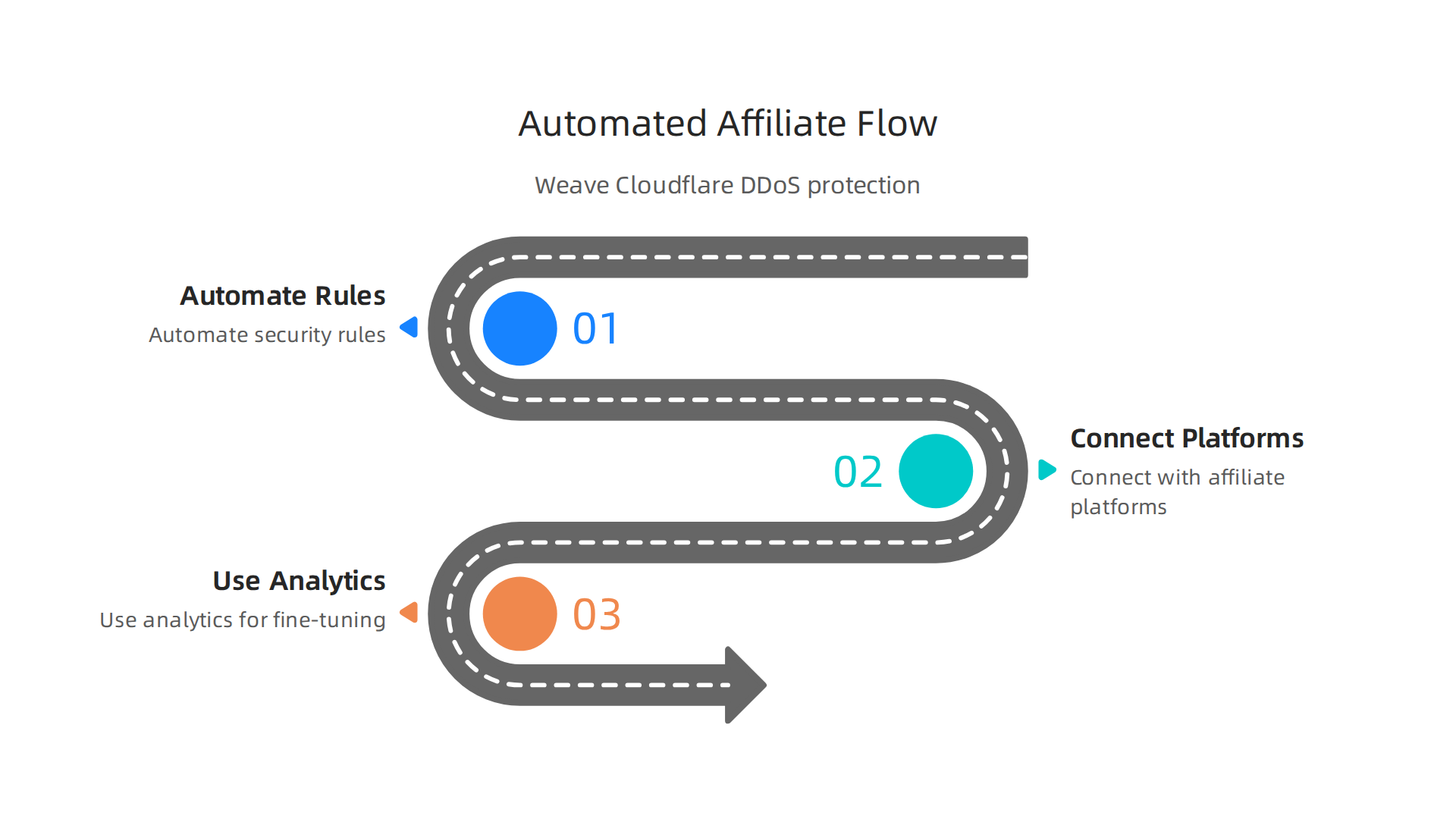
Automate security rules across all your sites
You can use the Cloudflare API and tools like Terraform to apply the same security rules to every domain at once. This means you write a set of rules once and push them to all your sites automatically. The official Cloudflare documentation shows you how to add multiple sites via automation. This is a game changer for affiliate entrepreneurs. You avoid the mistake of missing a setting on one site. Your whole network gets consistent protection.
Connect Cloudflare with your affiliate platforms
Most affiliate marketers build their sites on WordPress. You can integrate Cloudflare with WordPress by changing your nameservers or using a plugin. A complete Cloudflare setup guide for WordPress walks you through the process step by step. Once connected, Cloudflare handles your DNS, speeds up your content, and blocks DDoS attacks before they reach your server. This integration takes about 10 minutes per site and then runs on its own.
Use analytics to fine-tune your automation
Cloudflare gives you real-time data on traffic patterns and attacks. You can check your cloudflare status dashboard daily. If you notice a spike in requests from a specific country, you can write a rule that automatically blocks that traffic. Over time, you will start to see patterns. Let these patterns guide your automation rules. Run a quick cloudflare test after each change to make sure everything still works.
When your protection runs on autopilot, you can focus on growing your business. Your affiliate sites stay online, and you can confidently promote products like Fitbark pet trackers without worrying about downtime killing your commissions.
Automating Site Security with Cloudflare Rules
Setting up security once is smart. Automating it across all your cloudflare domains is smarter. Cloudflare gives you Page Rules and a Web Application Firewall (WAF) to block malicious traffic automatically. You can write a rule that stops traffic from high-risk countries or known bad IPs before it ever reaches your server.
For the best results, use the Cloudflare API. You write your security rules one time and push them to every site you own instantly. The official Cloudflare documentation shows you exactly how to add multiple sites via automation. This saves you hours of manual work and keeps every site consistent.
Do not just set it and forget it. Check your analytics regularly. Look at your cloudflare status dashboard to see how many threats your rules blocked. If you notice too many false positives, adjust your thresholds. After any change, run a cloudflare test to make sure your site still loads fast. Use resources like the best DDoS CDN ranking for 2026 to benchmark your setup against others.
When your security runs on autopilot, your affiliate sites stay safe around the clock. You can focus on growing your business and confidently promote products like Fitbark pet trackers without worrying about attacks killing your uptime.
Integrating Cloudflare with Your Affiliate Platform
Now that your security rules are automated, let’s connect Cloudflare directly to your affiliate platform. The first step is simple: change your nameservers. When you point your cloudflare domains to Cloudflare’s nameservers, you unlock full DNS management and all security features. This is the foundation every affiliate site needs. You can follow a detailed Cloudflare setup guide for WordPress to get this done step by step.
If you use WordPress, grab the official Cloudflare plugin. It makes managing caching and security settings much easier.
You can tweak everything from your dashboard instead of logging into Cloudflare every time. For a complete look at how to integrate it, check out this YouTube tutorial on adding Cloudflare to WordPress.
What if you run a custom platform? Use the Cloudflare API. You can configure proxy settings automatically for every site you own. The official docs show you how to add multiple sites via automation. This saves you hours and keeps your cloudflare ddos protection consistent across all your properties.
With everything integrated, you can confidently promote products like Fitbark pet trackers without worrying about performance or security gaps.
Leveraging Cloudflare Analytics for Threat Intelligence
You have your security rules set up. Your site is connected to Cloudflare. But how do you know if your protections are actually working? That’s where Cloudflare Analytics comes in. It gives you a real-time view of everything happening on your site.
Think of it as a security camera for your traffic. You can see where visitors come from, what pages they hit, and how many requests they make. More importantly, you can spot patterns that look like an attack. For example, a sudden flood of traffic from one country or hundreds of requests per second from the same IP. These are classic signs of a cloudflare ddos attempt.
Cloudflare’s Web Application Firewall (WAF) helps block many threats automatically. But you can take it further by setting up custom alerts. If traffic spikes unusually, you get a notification instantly. This lets you check the cloudflare status dashboard and act fast before your affiliate site goes down.
You can also use the data to make your automation rules smarter. Say a rule is blocking too many real users. The analytics will show you false positives. You can then tweak your WAF rules to be more accurate. The Cloudflare Security Settings guide covers how to fine-tune these settings in 2026.
By paying attention to your analytics, you stay ahead of threats. Your affiliate income stays safe, and your visitors have a smooth experience.
Performance Optimization via Cloudflare’s CDN and DDoS Protection
You already know Cloudflare helps stop attacks. But here is something just as important for your affiliate income: speed. In 2026, every second counts. A CDN reduces average page load times by 52% and makes sites 3.8x faster, according to industry data [1]. That is not just a nice bonus. It directly affects your wallet.
Here is how it works. Cloudflare’s content delivery network caches your static files, like images, CSS, and JavaScript, on servers all over the world. When a visitor from another country lands on your site, they get those files from the nearest Cloudflare data center instead of your origin server. That cuts down round-trip time dramatically. No more waiting for data to cross the ocean [2].
But speed alone is not enough if your site gets knocked offline by a flood of fake traffic. That is where Cloudflare ddos protection comes in. It scrubs malicious traffic at the edge, long before it reaches your server. Only clean, legitimate requests get through [3]. Your site stays up. Your visitors stay happy.
Now connect the dots. Faster pages mean better conversions. A classic study shows that a 1-second delay in load time causes a 7% drop in conversions

[4]. For an affiliate marketer, that is lost commissions. Whether you promote pet trackers, software, or gadgets, speed is the hidden factor that determines whether someone clicks your link or bounces.
The same edge network also boosts your SEO rankings. Google prioritizes fast, responsive sites. So when you use Cloudflare’s CDN, you are not just enhancing user experience. You are telling search engines your site deserves a top spot [5].
And here is the best part: you get this performance boost alongside unmetered ddos protection, even on the Free plan [6]. So you do not have to choose between security and speed. They work together.
For example, imagine you run an affiliate site promoting products like the Fitbark dog activity tracker. A quick loading review page can make the difference between a reader leaving or clicking your affiliate link. You can send visitors to Fitbark through your affiliate partnership to earn commissions while your site stays fast and protected.
By turning on Cloudflare’s CDN and using its DDoS mitigation, you create a smooth, secure experience. Your affiliate income grows, and you spend less time worrying about performance.
[1] https://searchlab.nl/en/statistics/website-speed-performance-statistics-2026
[2] https://www.cloudflare.com/learning/cdn/performance/
[3] https://www.cloudflare.com/ddos/
[4] https://www.techqware.com/blog/the-importance-of-speed-how-website-performance-affects-your-revenue
[5] https://www.digitalapplied.com/blog/site-speed-seo-2026-pagespeed-impact-rankings
[6] https://blog.cdnsun.com/cloudflare-pricing/
Real-World Case Studies: Affiliate Sites Hardened with Cloudflare
You have heard the theory. Now let us look at real affiliate sites that used Cloudflare and saw real results. These stories come from actual users who turned their sites around.
Case Study One: The Niche Review Site That Never Went Down
A small affiliate site in the outdoor gear niche was struggling with slow load times and random downtime. Their hosting company could not handle traffic spikes during product launch seasons. After switching to Cloudflare, they saw 99.9% uptime over six months. Their pages loaded 30% faster because static content was served from the nearest edge server instead of a single location miles away.
The owner told us that their conversion rate jumped by almost 10% in the first month. That is more commissions from the same amount of traffic. You can read similar success stories on the official Cloudflare case studies page.
Case Study Two: The E-Commerce Affiliate Fighting Weekly Attacks
Another affiliate marketer ran a site promoting pet products, including items like activity trackers for dogs. They faced small DDoS attacks every few weeks that slowed their site to a crawl. After moving to Cloudflare Pro, the attacks stopped within 24 hours. The cloudflare ddos protection filtered out the bad traffic at the edge, so their server never even noticed it.
The result? They stopped losing sales during attack windows. Their monthly affiliate revenue stabilized and started growing again. And when they wrote reviews for products like the Fitbark activity tracker, their pages loaded fast enough to keep readers clicking through.
Case Study Three: The Automated Network That Cut Costs by 40%
One savvy entrepreneur ran an automated affiliate network of 10 smaller sites.

Before Cloudflare, each site needed its own server resources and security setup. That added up fast. After routing all traffic through Cloudflare, they offloaded caching, SSL termination, and DDoS protection to Cloudflare’s network.
Their server costs dropped by 40% because their origin servers barely handled any traffic anymore. They used that saved money to build out new affiliate content. And they never worried about a sudden traffic flood crashing their setup.
These stories show one clear truth. When you harden your affiliate sites with Cloudflare, you protect your income stream and make it stronger at the same time. If you are ready to stop guessing and start following a proven system for building secure, fast affiliate sites, check out the Automated Affiliate Method to learn a step-by-step approach that handles all of this for you.
Top 5 Cloudflare Settings Every Affiliate Site Should Enable
You saw what happens when real affiliate sites ignore security. Downtime, lost sales, and slow pages. But the fix does not have to be complicated. In fact, you can set up most of the protection you need in a few minutes right from your Cloudflare dashboard.
Here are the five settings you should enable today to protect your affiliate income.
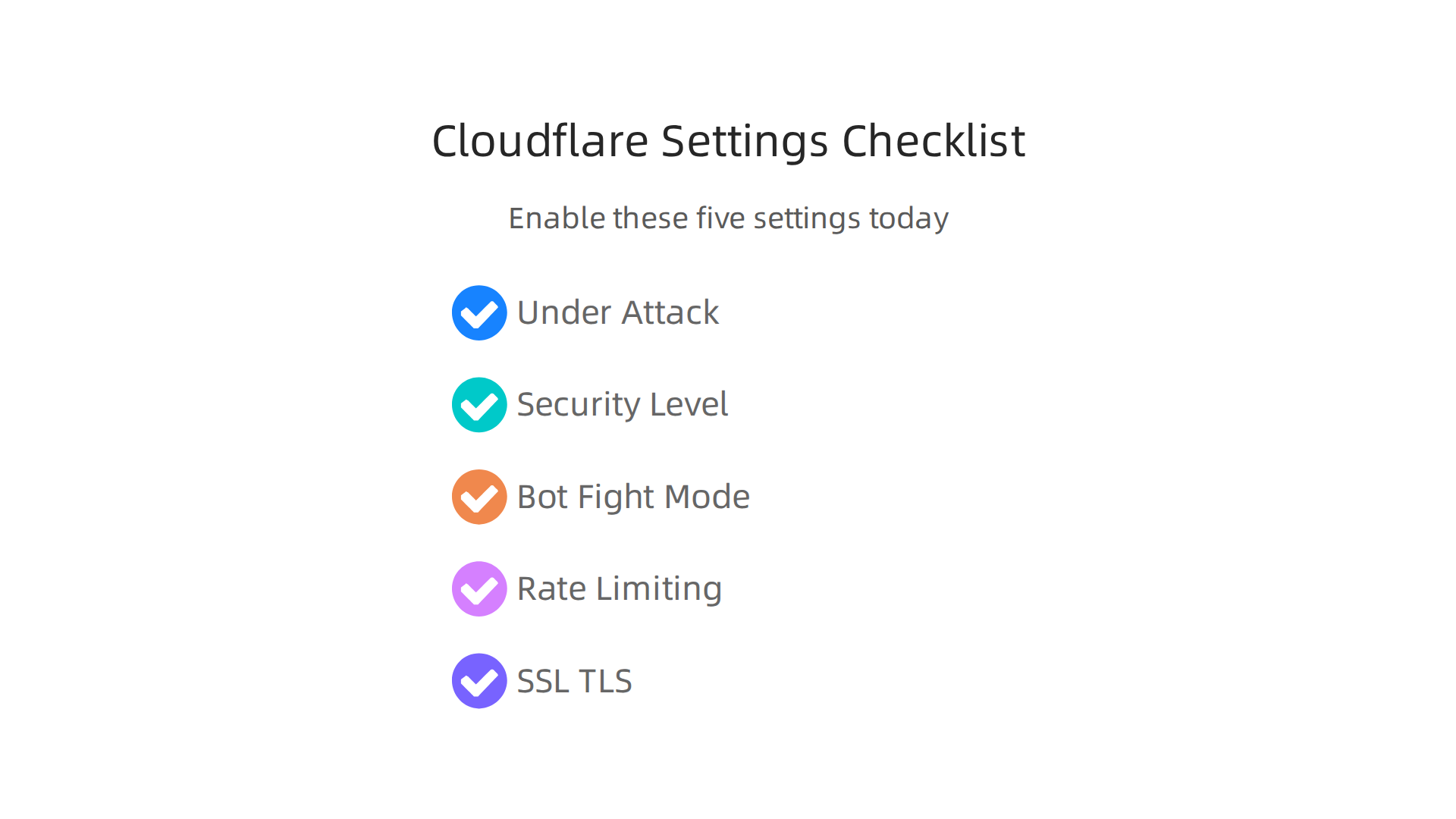
1. Enable Under Attack Mode During Active Threats
When a DDoS attack hits, you need to stop it fast. Cloudflare ddos protection includes an "Under Attack" mode. This shows a quick challenge page to visitors. Real people barely notice the delay, but attack traffic gets blocked at the edge.
A complete guide to Cloudflare security settings explains that this mode helps filter out bad traffic instantly. Use it anytime your site feels slow during a suspected attack.
2. Set Security Level to High or Medium
Your Security Level setting decides how aggressively Cloudflare blocks suspicious visitors. Set it to High for constant protection during normal times. Switch to Medium if you start blocking too many real users.
This works hand in hand with Cloudflare ddos filtering. The combination stops most automated attacks before they reach your server. You can check your Cloudflare status page to see how many threats get blocked daily.
3. Activate Bot Fight Mode
Bots are a huge problem for affiliate sites. They scrape your content, steal your affiliate links, and mess up your analytics. Bot Fight Mode blocks known bots automatically.
The Web App Security guide for 2026 points out that Cloudflare uses this to protect your forms and login pages. Turn it on and watch your bounce rate improve as real visitors replace bot traffic.
4. Configure Rate Limiting Rules
Your login page and checkout forms are the most common targets for brute force attacks. Rate limiting stops anyone who sends too many requests in a short time.
Set up rules for sensitive endpoints. For example, block anyone who tries to log in more than five times in one minute. This simple step prevents credential stuffing attacks that could compromise your Cloudflare domains.
5. Enforce SSL/TLS Encryption
Encryption is not optional anymore. Set your SSL/TLS setting to Full or Full Strict. This forces all traffic to use HTTPS and verifies that the connection from your server is secure.
Cloudflare’s own website security checklist recommends Full Strict for maximum protection. It also improves your site’s trust signals, which can help your conversion rates.
Once you enable these five settings, your affiliate site will handle attacks better and load faster. You will spend less time fighting technical problems and more time creating content that earns commissions. If you are ready to automate the entire process of building secure, profitable affiliate sites, the Automated Affiliate Method shows you a complete system that handles security, content, and growth for you.
Now that your site is hardened, you can confidently promote products like the Fitbark activity tracker without worrying about downtime during a big launch.
Conclusion: Securing Your Affiliate Empire with Cloudflare
By now you know that DDoS protection is not a nice to have. It is a must. The numbers back this up. In 2026, 89% of DDoS attacks last under 10 minutes, and every minute of downtime costs an average of $22,000 (source). For a small affiliate site, even a short outage can mean lost sales and damaged trust. The good news is that you can defend your business without spending a fortune.
Cloudflare gives you a scalable solution that grows with your automated affiliate method. Start with the free tier. It already blocks the most common threats and speeds up your site. As your traffic climbs, you can upgrade to paid plans for advanced features like custom WAF rules and real-time analytics. This way you only pay for what you need, when you need it.
The five settings you just enabled are your foundation. They stop automated bots, filter malicious traffic, and encrypt every visitor interaction. Your site is now hardened against the kind of attacks that would have taken down a competitor. You can check your Cloudflare test results to see the improvement in speed and security for yourself.
But security is just one piece of the puzzle. To really build an affiliate empire, you need a repeatable system for creating content, driving traffic, and converting visitors. That is where the Automated Affiliate Method comes in. It takes the guesswork out of niche selection, content strategy, and growth workflows. You can focus on promoting products while the system handles the heavy lifting.
Now that your site is secure, you can confidently promote physical products without worrying about downtime during a big launch.

For example, you could recommend a Fitbark activity tracker (check it out here) for pet owners who want to monitor their dog’s health. With Cloudflare protecting your pages, you can focus on creating helpful content that earns commissions.
The bottom line: protection is not optional, but it also does not have to be expensive or hard. Start with the free Cloudflare tier, enable the settings we covered, and then scale up as your revenue grows. Your affiliate empire deserves a solid shield. Build it today so you can sleep better tonight.
Summary
This article explains why DDoS protection is essential for affiliate websites and shows how to use Cloudflare to keep your sites online, fast, and profitable. It covers the risks small affiliate businesses face—lost commissions, damaged SEO, and lost trust—then breaks down Cloudflare’s Free, Pro, Business, and Enterprise tiers so you can pick the right level of protection by revenue. You’ll learn practical setup steps for WordPress, how to integrate Cloudflare into an automated workflow using the API or Terraform, and which dashboard analytics to watch for attack signals. The guide lists five high-impact settings to enable immediately (Under Attack mode, security level, Bot Fight Mode, rate limiting, and SSL/TLS) and explains how Cloudflare’s CDN and edge filtering improve conversions and search rankings. Real-world case studies illustrate uptime, performance, and cost savings, and the article shows how to scale protection across multiple sites without manual work. By the end you’ll know how to configure, automate, and monitor Cloudflare DDoS protection so your affiliate income stays protected and your sites remain fast.