YouTube 2 Way Interactions Settings for Community Building and Affiliate Income

Introduction: Why Two-Way Interactions Matter on YouTube
Here’s something most YouTube creators miss in 2026. You can publish the perfect video, nail your thumbnail, and write a killer title. But if nobody talks back to you, the algorithm barely notices.
That’s because YouTube today is not a broadcast platform. It’s a conversation.

The numbers back this up. YouTube continues to grow at a massive scale in 2026, with billions of active users worldwide looking at the latest stats. But here’s the real shift. The algorithm now rewards channels that spark genuine two-way conversations between creators and viewers. Comments. Polls. Live chats. Community posts. These signals tell YouTube that your content matters to real people.
Why does this matter for affiliate marketers? Think about it. When someone comments on your video asking which product you recommend, and you reply with an honest answer, that’s trust building in real time. When you run a poll asking your audience what problem they want solved, you discover exactly what to promote next. Interactive features like live chat, polls, and community posts are not just engagement fluff. They are powerful tools that build trust and drive sales.
The best part? YouTube gives you a full set of settings to make this happen. You just need to know which buttons to press and when.
This guide will walk you through every YouTube setting that enables two-way interactions. I will show you how to optimize each one for better engagement and more affiliate revenue. Whether you are trying to figure out how to get more views on YouTube, wondering can YouTube creators see who viewed their videos, or looking for how to play all videos on a YouTube channel in a smarter sequence, this guide has you covered.
If you want to build a real business around your YouTube presence, having a clear system for content creation makes all the difference. The Automated Affiliate Method gives you a repeatable process for exactly that kind of strategic growth.
Let’s dive into the settings that turn one-way viewers into two-way communities.
What Are YouTube 2-Way Interactions?
So what exactly makes a YouTube interaction "two-way"? It sounds like a buzzword, but it really just means your audience can talk back to you. Instead of broadcasting a message and hoping it sticks, you open the door for a real conversation.
A YouTube 2 way interaction is any feature that lets a viewer respond, ask a question, or engage directly with you as the creator. It turns a one-way lecture into a back and forth dialogue.
Think about the difference between a TV commercial and a friendly chat with a neighbor. The commercial just talks at you. The chat lets you ask questions, share your opinion, and get a real answer. That is exactly what two-way interactions do for your YouTube channel.
Here are the main tools YouTube gives you to make this happen:
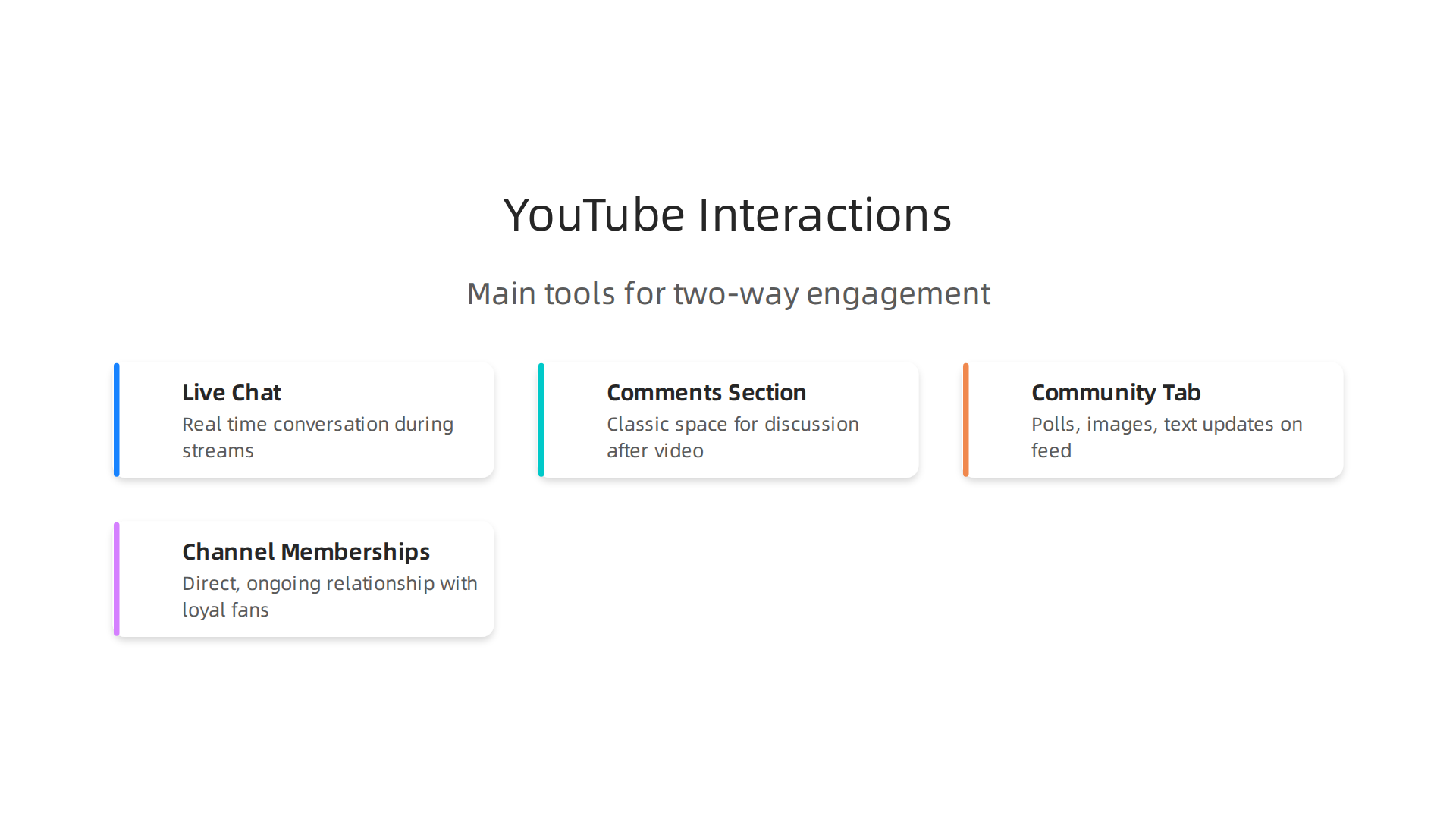
- Live Chat and Super Chat: Perfect for real time conversation during streams.
- The Comments Section: The classic space for discussion after a video goes live.
- Community Tab Posts: Polls, images, and text updates that let you interact right on your channel feed without uploading a video.
- Channel Memberships: A direct, ongoing relationship with your most loyal fans.
Why do these matter so much in 2026?
When a viewer comments, votes in a poll, or joins a live chat, they send a strong signal to the YouTube algorithm. The platform sees that your content is not just being watched. It is being used. Real people are engaging with it. When you market on YouTube today, creating these moments of interaction is essential for growth as explained in modern YouTube marketing strategies.
For affiliate marketers, this is a huge advantage. A comment asking "Which tool do you use for this?" is a direct sales lead. A poll asking "What is your biggest struggle with X?" tells you exactly what product to recommend next.
Building this type of engaged community requires a solid system. You can learn how to structure a content strategy that sparks these conversations by reading about how to make a viral video for affiliate marketing with a repeatable system.
Two-way interactions are the engine that turns passive viewers into active community members. And that community is what drives real, sustainable affiliate income.
Essential YouTube Settings for Two-Way Interactions
Knowing the tools is just the start. To make the most of YouTube 2 way interactions, you need to find the right controls inside YouTube Studio.

These settings decide whether your audience can talk back, when they can talk, and who gets to speak. Getting them right makes a huge difference in how your channel feels to viewers and how often they engage.
Let’s walk through the three core areas where you can set the rules.
Live Chat Settings: Control the Conversation in Real Time
If you go live or host a premiere, you can customize the chat experience. Here are the main toggles to know:
- Chat replays: This shows chat messages from the live stream on the video playback after it ends. It keeps the conversation visible for later viewers and can spark more engagement.
- Slow mode: Limits how often a user can send a message (for example, every 30 seconds). This helps prevent spam and gives you time to read and reply.
- Emoji-only mode: Restricts chat to emojis. It is great for casual streams where you want quick reactions without long messages.
- Membership gating: Only channel members can chat during a live stream. This rewards your most loyal fans and creates an exclusive feel.
You can find these options in Live Control Room under the chat settings panel.
Comment Settings: Shape the Discussion After the Video
Your comment section is where most two-way conversations happen. But without the right settings, it can become a mess of spam or negativity. YouTube Studio gives you several tools to keep things healthy:
- Approval workflow (hold all comments for review): This gives you full control. No comment appears until you manually approve it. It is the safest option for new channels or sensitive topics.
- Pinned comments: You can pin your own comment (or a viewer’s) to the top of the section. Use this to answer a common question, highlight a key point, or ask a follow-up question to start a thread.
- Moderation filters: You can set blocked words and define a list of approved or hidden users. YouTube also offers a Channel guidelines page where you can welcome viewers and set expectations. Setting clear channel guidelines helps maintain a positive community.
Access these under Settings > Community > Defaults.
Community Tab: Enable Posts, Polls, and Images
The Community tab is one of the most powerful tools for daily engagement without needing to upload a video. To use it, your channel needs at least 500 subscribers (and it’s available on any channel that reaches that threshold). If you qualify, it should appear automatically in YouTube Studio. If not, you can apply under the "Feature eligibility" section.
Once enabled, you can:
- Create poll posts to ask your audience’s opinion on a topic, a product, or what video to make next.
- Share image posts with behind-the-scenes shots, product photos, or memes that invite reactions.
- Post text updates to share thoughts, links, or quick announcements.
The 2026 playbook for the Community tab emphasizes posting with a clear purpose rather than just "staying engaged." It works best when you ask questions that make viewers want to reply or vote.
When you combine these settings, you create a channel where conversation feels natural and frequent. That kind of active community is exactly what the algorithm rewards and what leads to more views. And when your audience trusts you and talks to you, your affiliate recommendations land with much more impact.
Getting the technical setup right is just one piece of the puzzle. To build a complete system that turns engagement into steady affiliate income, the affiliate marketing system that scales without burning you out can show you how to connect all the dots.
Live Chat Settings
When you go live or host a premiere, your live chat becomes the main place for youtube 2 way interaction. But without the right rules, chat can get messy fast. Here are three essential settings to keep things friendly and useful.
Slow mode. This limits how often someone can send a message, like once every 30 seconds. It cuts down on spam and gives you time to actually read and reply. Viewers feel heard instead of ignored. You can turn it on in the Live Control Room under chat settings.
Members-only chat. You can restrict chat to paying channel members only. This makes your live streams feel exclusive and rewards your top supporters. It also encourages more viewers to hit that subscribe button if you offer membership perks.
Chat replays. When you enable chat replay, the messages from your live stream stay visible on the video after it ends. Later viewers can see the conversation and feel like part of the community. This helps boost engagement over time and can lead to more comments on the recorded video.
To keep your live chat healthy, combine these with clear channel guidelines that tell viewers what behavior is welcome. That way everyone knows the rules from the start.
When your live chat feels like a real conversation, viewers are more likely to trust you. And trust is the foundation for turning those interactions into affiliate income. The affiliate marketing system that scales without burning you out can help you connect all the pieces.
Comment and Community Tab Settings
Your comment section and Community tab work like a 24/7 conversation hub. Here is how to set them up for real youtube 2 way interaction.
Pin a comment to the top. You can pin one comment to the top of your video’s comment section. This is a powerful spot to share an important link or a call to action. Use it to point viewers toward a recommended product or a related video. It is the first thing people see when they scroll down.
Hold comments for review. In YouTube Studio, go to Settings and then Community. You can turn on moderation to hold comments that might be spam or inappropriate for your review. This keeps the space friendly and encouraging for everyone. It helps you build a positive community where people want to share their thoughts.
Post polls on the Community tab. The Community tab is your main tool for engaging subscribers between uploads. Polls are a quick way to ask for opinions and learn what your audience wants. A simple poll like "Which video format do you prefer?" can get dozens of responses and shows YouTube your audience is active.
When your community feels heard and respected, they are much more likely to support you. That support often turns into clicks on your affiliate links. For a complete system on building a channel that earns while you sleep, you can check out the affiliate marketing system that scales without burning you out.
Step-by-Step: Optimize Your YouTube Settings for Two-Way Interactions
You already know the basics of comments and the Community tab. But to build a real youtube 2 way conversation, you need to fine-tune your youtube settings. Let me walk through the exact steps that make your audience feel heard and keep them coming back.
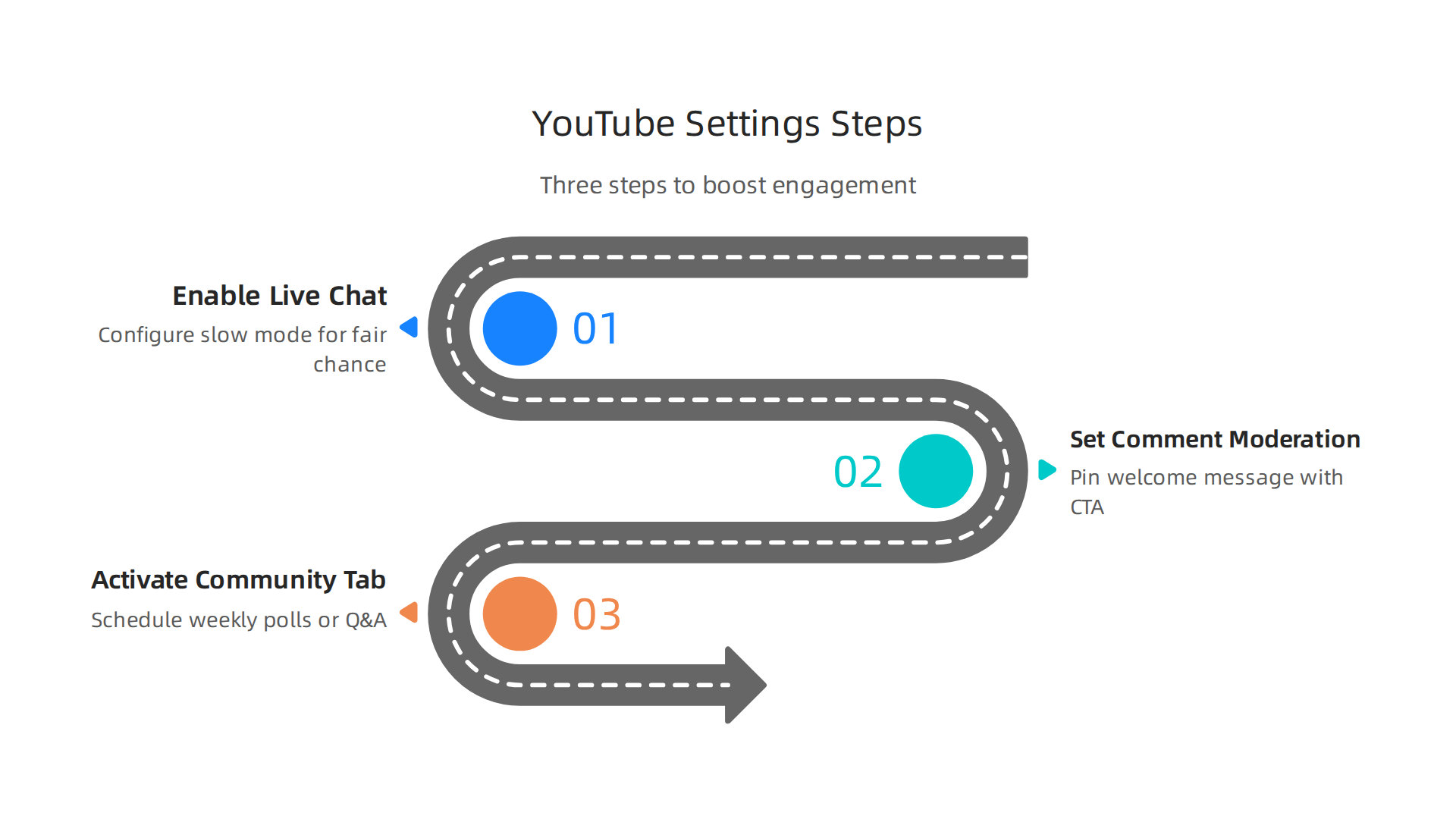
Step 1: Enable live chat and configure slow mode.
Live chat turns a video into a real-time conversation. But if your chat moves too fast, comments get lost. Turn on slow mode in your live stream settings. This limits how often each person can send a message. For smaller channels, 30 seconds works well. For bigger audiences, try 10 seconds. It gives everyone a fair chance to speak.
Step 2: Set up comment moderation and pin a welcome message with a CTA.
Go to YouTube Studio, click Settings, then Community. Under defaults, you can choose to hold comments for review. This keeps the space friendly and spam-free. YouTube’s official guide shows you how to enter a welcome message and set channel guidelines that match your tone. Then, on each video, pin a comment at the top. This is your prime real estate. Use it to thank viewers, ask a question, or point them to a recommended link.
Step 3: Activate the Community tab and schedule weekly polls or Q&A posts.
The Community tab is a powerful tool for engagement between uploads. According to a 2026 playbook, you should post consistently and ask questions that get responses. You can schedule polls asking what content viewers want next. This not only boosts engagement but also gives you data on what your audience likes. Scheduling weekly posts shows YouTube your channel is active, which can help answer common concerns like how to get more views on youtube.
Many creators wonder, can youtube creators see who viewed their videos? Not exactly, but engagement signals like comments and Community tab activity tell you who is paying attention. And while you are building that engagement, you might also want to know how to play all videos on a youtube channel for binge-watching. The real win is creating a repeatable system.
When your two-way interaction settings are dialed in, your channel becomes a community. People comment, vote, and feel part of something. That trust translates to clicks on your recommendations. To turn that engagement into a scalable business, you need a repeatable system. Check out how to make a viral video for affiliate marketing with a repeatable system for the next step.
Enabling and Customizing Live Chat
Live chat can feel like a wild party. People type fast, messages scroll by, and your most loyal fans get lost in the noise. That is the opposite of the youtube 2 way interaction you want. The fix? Go to YouTube Studio, click Settings, then Live Streaming. Make sure chat features are turned on. Then customize slow mode.
For newer channels, set slow mode to 10 seconds between messages. This gives everyone a fair chance to speak. According to YouTube’s official support, you can set channel guidelines that guide viewer behavior directly in your chat rules. Pin a welcome message at the top of every live stream. Ask a question. Thank people for being there.
Here’s the thing. Slow mode alone is not enough. You need to build trust so people want to come back. That trust comes from feeling heard. When viewers know you read their messages, they engage more. More engagement signals to YouTube that your content matters. That can help answer the old question of how to get more views on youtube.
Many creators ask can youtube creators see who viewed their videos. The answer is no for individual viewers, but engagement data like live chat tells you who is active. Use that info to shape your content. And if you want to keep viewers watching longer, you might look up how to play all videos on a youtube channel for easy binge-watching.
Your youtube settings for live chat are simple to set up but powerful over time. Once people feel part of the conversation, they stick around. That is how you turn a live stream into a loyal community.
Leveraging Community Posts and Polls
Live chat gets the conversation going. But community posts keep it going when you are not streaming. These posts show up right in your subscribers’ feeds. You can share images, text, or quick polls.
Polls are a goldmine for the youtube 2 way connection. They take seconds to answer. And they give you instant feedback. Ask your audience what they want to see next. Or ask which topic confuses them most. That data helps you plan better videos.
You can also use polls to test affiliate product ideas. For example, ask "Which tool would you like me to review next?" Their answers guide your recommendations. This is smart because the best affiliate marketing platforms in 2026 reward creators who promote what their audience actually wants. When you match products to real needs, you earn more trust and more commissions.
Tease your next video with a community post. Share a behind the scenes photo. Ask a fun question. Every post is a chance to build habit. If you want to turn this into a real business, check out our guide on affiliate marketing business basics to see how small interactions add up over time.
Small actions like polls and posts make your channel feel alive. And that keeps people coming back.
Turning Interactions into Affiliate Income
So your community is active. People are talking in live chat, voting in polls, and sending Super Chats. That is great for your channel health. But here is the real question: Can it pay the bills? Yes, it can. The secret is using these youtube 2 way interactions as a bridge to affiliate income. When done right, you are not selling. You are solving.
Use Pinned Comments and Live Chat
The first place to start is your comment section. When a video goes up, pin a comment that includes an affiliate link to a product you just used. Let us say you made a video about dog training. Pin a comment like, "I use the FitBark collar to track my dog’s activity. It helps me spot health issues early." Then drop your FitBark affiliate link right there. It feels like a helpful follow-up, not an ad.
In live chat, wait for the right moment. If someone asks, "What microphone do you use?" that is your cue. Share your affiliate link for that microphone right in the chat. This works because you answered a direct question. This kind of real-time help is a core part of the affiliate marketing strategies that work in 2026.
Use Community Polls as Product Research
Do not guess what your audience wants to buy. Ask them. Use the community tab to create a poll. Ask, "Which of these tools would you like me to review?" or "What is your biggest struggle with [your niche]?"
This is a perfect example of the youtube 2 way relationship. You give them a voice, and they give you data. Once you know what they want, create a video reviewing that product. Then put your affiliate link in the pinned comment. You already know people are interested. This makes your affiliate content much more likely to convert. This approach also teaches you how to get more views on youtube because you are making content your audience specifically requested.
If you want a full system for turning this kind of content into income, learning how to build an affiliate marketing system that scales without burning you out is a smart next step.
Turn Super Chat into Shout-Outs
Super Chats are a direct way for fans to support you. But you can also use them to share value. When someone sends a Super Chat, read their message live. Then, if it fits, say, "Great question! I have a link in the pinned comment that will help with that."
You can even create a special offer. For example, "For the next hour, anyone who Super Chats gets access to a special discount link for [Affiliate Product]." This makes your Super Chat feel like a VIP experience. It rewards your biggest fans and introduces them to tools you already trust. This is another strong youtube 2 way strategy that builds loyalty and income at the same time.
When you combine these methods, your channel becomes more than a place for videos. It becomes a community where you provide value and earn income as a natural byproduct.

The key is always to lead with help, not hype. Try these ideas in your next stream or video.
Advanced Interaction Features: Super Chat, Memberships, and More
In the last section, you saw how comments and polls can fuel affiliate income. Now let us look at the tools YouTube built for direct support and community building. These advanced features make the youtube 2 way relationship even stronger. They also open doors to steady income that goes beyond ad revenue alone.
Super Chat: The Direct Support Line
When you go live, Super Chat lets viewers pay to highlight their message. It stays at the top of the chat in bright colors. This is a great way for fans to get your attention during a busy stream. You can also send Super Stickers, which are fun animated images that pop up on screen. Viewers love using them to react without typing.
This tool is one of the top ways to earn money directly from your live content. As one guide on monetization points out, Super Chat helps you connect with your fans while opening up a new revenue stream at the same time.
Channel Memberships: Build an Inner Circle
Channel Memberships are like a VIP club. Fans pay a monthly fee for perks. They get special badges, unique emoji, and sometimes access to exclusive posts or streams.
This creates a steady, recurring income for you. More importantly, it builds a very loyal community. This is a true youtube 2 way model. They get exclusive value, and you get reliable support.
The good news is that getting access to Memberships is easier than ever. In 2026, you can join the YouTube Partner Program with just 500 subscribers and 3,000 watch hours. That means more creators can start earning this way sooner.
Premieres: The Best of Both Worlds
Do not forget about Premieres. You schedule a pre-recorded video, and it plays like a live event. Viewers gather in the live chat before, during, and after the video plays. They react together in real time.
You get the polished look of an edited video plus the excitement of a live stream. It is perfect for product launches or big announcements. This feature creates a shared moment that regular uploads just cannot match.
These three tools turn your channel from a one-way broadcast into a lively hub. They encourage real conversations. A connected community is far more likely to support you, whether through a monthly Membership or by trusting your product recommendations. To build a reliable system that captures this value and turns it into income, check out what no one tells you about automated affiliate marketing in 2026.
Measuring Success: Key Metrics for Two-Way Engagement
You have learned about Super Chat, Memberships, and Premieres. These tools turn your channel into a true youtube 2 way conversation. But how do you know if your efforts are paying off? The answer is in the numbers. Tracking the right metrics helps you understand what works and what needs tweaking.
The Core Metrics That Matter
Not every number in your dashboard is equally important. Focus on the ones that show real interaction. These are the metrics that prove your audience is engaged in a two-way conversation:
- Comment count. More comments mean people are talking back to you. This is a direct sign of engagement.
- Live chat message volume. During a live stream or Premiere, the number of messages shows how active your community is. High volume means your content is sparking conversation.
- Community post likes and comments. These posts give you another way to connect between videos. Tracking their engagement shows if your audience wants to hear from you more often.
- Super Chat revenue. This is cold, hard proof that viewers value your content enough to pay for attention. It is one of the most direct measures of support you can get.
According to recent data, engagement metrics like these are essential for understanding how your content performs. As one guide explains, “engagement metrics show how people interact with your content. This includes likes, comments, shares, and other actions on social networks.”
Using YouTube Analytics for Deeper Insights
Your YouTube Studio dashboard is a goldmine of data. You can find engagement rates for each video, your channel, and even specific features like Super Chat. YouTube Analytics Advanced Mode lets you filter by date range, content type, and audience segment. This helps you spot patterns. For example, you might notice that videos with high live chat volume also have better watch time. That is a strong signal that two-way interaction keeps viewers on your channel longer.
One detailed guide from 2026 explains that you can use Advanced Mode “to understand your performance so you can improve content, optimize audience engagement, and tie your efforts back to your goals.”
Connecting Engagement to Your Bottom Line
Engagement is great, but you also want it to lead to real results, like more views or affiliate sales. That is where external tools like Google Analytics come in. You can set up custom goals to track what happens after someone watches your video. For example, you can track how many viewers click an affiliate link in your description or visit your website.
Here is a simple process to get started:
- Link your YouTube account to Google Analytics using the YouTube channel settings.
- Create a goal for a specific action, such as visiting a thank-you page after buying through your link.
- Monitor which videos drive the most goal completions.
- Try to figure out what makes those videos special. Is it the live interaction? The comments you reply to?
When you connect engagement metrics with conversion data, you get a full picture of your channel’s health. You can then double down on the content and interaction styles that work best.
Keep Improving with the Right Data
Remember, the goal is not just to get more views. It is to build a community that supports you financially. By tracking comment volume, Super Chat revenue, and conversion data, you can refine your approach. And if you want to turn that engaged audience into a steady affiliate income, learning how to make a viral video for affiliate marketing with a repeatable system can be your next step.
In the end, measuring success on YouTube in 2026 is about understanding the youtube 2 way relationship you have built. The numbers tell you if your audience is listening and if they are ready to take action. Use them wisely.
Common Pitfalls and How to Avoid Them
You now know how to measure success and build a youtube 2 way connection. But even good plans can go wrong if you fall into common traps. Here are the biggest mistakes and how to avoid them.

Over-moderating comments
Some creators hide every comment that feels negative or off topic. This kills the conversation. If you delete too much, people stop talking. Instead, find a balance. Let real questions stay up and answer them. You can still remove spam or hate speech. But let your community speak freely. This builds trust and keeps the youtube 2 way feeling alive.
Neglecting the community tab
Your community tab is a simple way to connect between videos. Yet many creators ignore it. That is a missed chance. Polls, updates, and questions remind your audience you are there. They also get more views on your youtube channel when people come back to answer. Use the tab at least once a week to start a conversation.
Spamming affiliate links in every interaction
This one hurts your income the most. When you drop affiliate links in every comment or stream, your audience stops trusting you. They feel like you only care about money. According to a Tubefilter report, over 80,000 channels earned money from Super Chat and other direct support features source. That shows viewers will support you without you pushing links everywhere. Instead, share links only when they help solve a problem. Build value first. If you want a repeatable system for earning affiliate income the right way, check out this guide on making a viral video for affiliate marketing.
If you ever wonder can youtube creators see who viewed their videos, the answer is no. But you can see engagement metrics that tell you if people are sticking around. So focus on real connection, not just numbers. Avoid these pitfalls and your youtube 2 way strategy will thrive.
Summary
This article explains why YouTube in 2026 rewards two-way interactions and shows creators how to turn viewers into an engaged community that supports affiliate revenue. It defines the key interactive features—live chat, comments, Community tab, Super Chat, memberships and Premieres—and walks through the exact YouTube Studio settings to enable, moderate, and optimize them. You’ll learn step-by-step configuration for slow mode, chat replay, pinned comments, comment moderation, and Community polls, plus practical ways to use those features to research products and share affiliate links without alienating your audience. The guide also covers advanced monetization tactics, what engagement metrics to track, and common pitfalls to avoid so your channel grows sustainably. By the end you’ll have a repeatable system to encourage meaningful conversation, measure its impact, and convert trust into affiliate income.